Feature-rich Android reader for many ebook and document formats
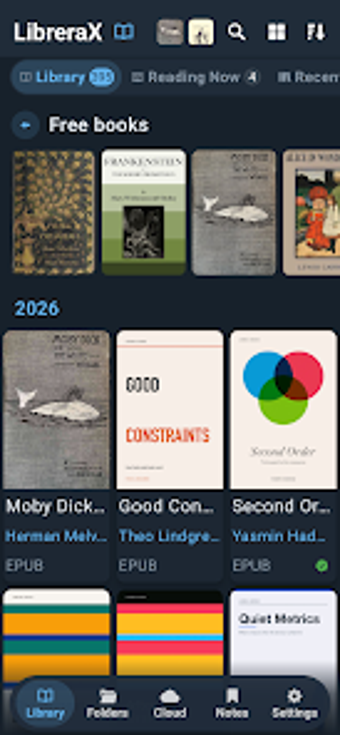
LibreraX - EPUB Reader PDF opens EPUB, PDF, MOBI and comic files using separate rendering engines for reflowable and fixed layouts, letting readers handle both novels and complex PDFs. The app, from Librera, scans device storage into a searchable library and supports cloud sync and OPDS catalogs. Custom reading themes, hex color control, and TTS make it suitable for avid readers, students, and professionals who want granular control over display and playback.
What can the app actually open and display?
LibreraX reads a broad set of formats, including EPUB, MOBI, AZW/AZW3, FB2, CBZ, TXT, Markdown and PDF, as noted in the format list. It separates reflowable rendering using foliate-js from fixed-layout PDF rendering with PDFium, which the developer uses to support pinch-to-zoom, page fitting, and night-mode document tinting.
How does it support study methods and read-aloud learning?
Text-to-Speech integrates with Android TTS engines and exposes media controls and lock-screen playback, so learners can listen to books hands-free. For memorization or listening-based study, sync of reading progress and bookmarks to Google Drive preserves position across devices, which supports repeated review sessions.
Is it suitable for different learner levels and classroom use?
The app suits self-directed learners and educators who manage varied material, because its automatic library scanning groups series and pulls cover metadata, reducing setup time for large collections. Theme customization with hex color input and contrast validation helps adapt text presentation for readers with visual preferences or accessibility needs.
How does it show progress and let users customise content?
Progress and library state sync across devices via cloud support, and users can create or edit reading themes that change fonts, spacing, and backgrounds such as aged paper. OPDS catalog support links the local library with online sources, which lets students import external reading lists without manual file transfer.
Who should choose LibreraX and why
LibreraX is a configurable reader for Android users who need multi-format support, precise display control, and audible playback tied to saved progress. Expect an app that rewards time spent tailoring themes and organizing large libraries; less configuration-focused users may find initial setup detailed. Tip: set a daily sync and a preferred theme once, then use TTS sessions to convert reading time into review time.